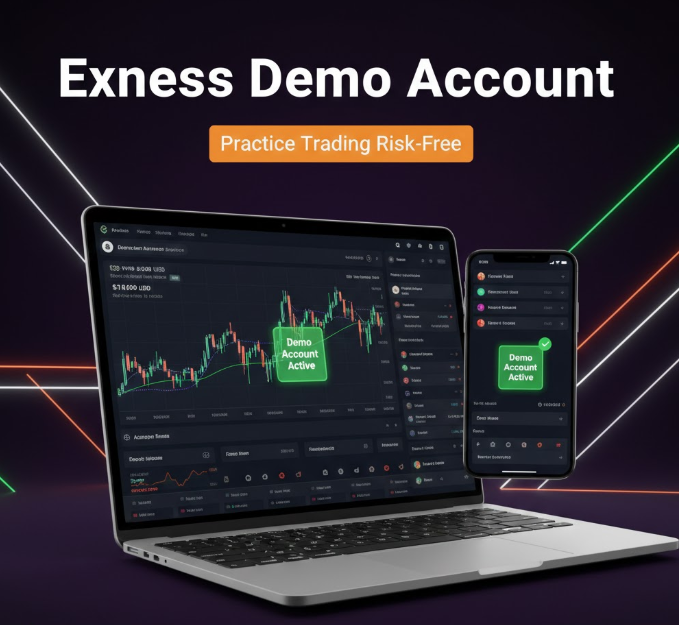
For anyone starting in online trading, learning the ropes without risking real money is essential. This is where demo accounts come in. Exness provides a user-friendly demo account feature that allows traders to practice trading, explore platforms, and test strategies in a simulated environment.
This comprehensive guide walks you through the process of creating a demo account on Exness, navigating its features, and using it to build confidence before trading with real money.
What Is a Demo Account on Exness?
A demo account is a practice trading account that simulates real-market conditions without using actual money. It allows traders to:
-
Learn how to use trading platforms like MetaTrader 4 (MT4) and MetaTrader 5 (MT5)
-
Test trading strategies without financial risk
-
Understand market behavior, spreads, and execution times
-
Gain confidence before opening a real account
In 2026, Exness continues to provide realistic market simulations for beginners and experienced traders alike.
Benefits of Using a Demo Account
1. Risk-Free Learning
Trading can be complex, especially for beginners. Demo accounts let you practice without risking real funds.
2. Platform Familiarity
Demo accounts allow you to explore MT4 and MT5 features, including charting tools, indicators, order types, and risk management features.
3. Strategy Testing
You can test new trading strategies under live market conditions. This helps identify strengths and weaknesses before committing capital.
4. Confidence Building
By repeatedly trading in a risk-free environment, beginners develop confidence and reduce emotional trading mistakes.
5. Understanding Trading Costs
Even though demo accounts use virtual funds, you can observe spreads, commissions, and leverage effects, preparing you for real accounts.
Step 1: Visit the Official Exness Website
-
Open your preferred browser.
-
Navigate to the official Exness website:
-
Ensure the URL begins with https:// to confirm security.
-
Click Sign Up or Create Account if you don’t already have an Exness profile.
If you already have a real account, you can log in and create a demo account from your dashboard.
Step 2: Register or Log In
New Users
-
Enter your email address or phone number.
-
Create a strong password.
-
Select your country of residence.
-
Click Continue and verify your email or phone via the code sent.
Existing Users
-
Log in with your Exness credentials.
-
Access the Client Area dashboard.
Step 3: Navigate to the Demo Account Section
-
Once logged in, go to the Trading Accounts section.
-
Click Create Demo Account or Open Demo Account.
Exness allows you to open multiple demo accounts if needed, which is useful for testing different strategies or account types simultaneously.
Step 4: Choose Your Demo Account Type
Exness offers demo versions of its real account types, including:
-
Standard Demo Account: Beginner-friendly, no commission, slightly wider spreads
-
Raw Spread Demo Account: Very tight spreads, commission applies per lot
-
Zero Demo Account: 0 pip spreads on major pairs, commission applies
-
Pro Demo Account: Advanced tools for professional-style trading
Choose the account type that aligns with the strategy you want to practice.
For beginners, the Standard Demo Account is recommended, while more advanced traders may choose Raw Spread, Zero, or Pro demo accounts.
Step 5: Select Trading Platform
Exness supports two main platforms for demo trading:
MetaTrader 4 (MT4)
-
Best for beginners and casual traders
-
Offers simple charting, indicators, and automated trading
MetaTrader 5 (MT5)
-
Advanced features for professional traders
-
Multi-asset platform (forex, stocks, indices, commodities)
-
More indicators and timeframes than MT4
Choose the platform that matches your intended real account or personal preference.
Step 6: Set Account Preferences
When creating your demo account, configure the following:
-
Leverage: Choose from available options (commonly up to 1:2000).
-
Base Currency: Usually USD, EUR, or local currency.
-
Deposit Amount: Virtual funds can usually be set (e.g., $1,000 or $10,000).
-
Account Nickname: Optional, for easy identification if you open multiple demo accounts.
After configuring, click Create or Confirm.
Step 7: Access Your Demo Account
After creation, your demo account login details will appear. You can:
-
Download MT4/MT5 desktop or mobile platform and log in with these credentials
-
Use the Web Terminal from your dashboard for instant access
-
Access account settings in the Client Area
The interface will simulate live trading conditions with virtual funds
Step 8: Explore the Demo Platform
Key Features to Test
-
Charting Tools: Trend lines, candlestick patterns, indicators
-
Order Types: Market, pending, stop-loss, take-profit
-
Trading Instruments: Forex, commodities, indices, cryptocurrencies
-
Leverage and Margin Effects: Understand how leverage affects risk
Take your time exploring all features. The more familiar you are, the smoother your transition to real trading will be.
Step 9: Practice Trading Strategies
Use your demo account to:
-
Place trades with virtual funds
-
Test strategies such as scalping, swing trading, or hedging
-
Monitor results and analyze mistakes
-
Adjust parameters without risking real money
Demo trading is an ongoing learning process. Treat it seriously to maximize skill development.
Step 10: Monitor Performance
Most demo accounts offer:
-
Profit/loss tracking
-
Trade history
-
Equity and margin monitoring
Regular review helps identify weaknesses and refine your approach before moving to real trading.
Step 11: Upgrade to a Real Account (Optional)
Once confident, you can open a real trading account:
-
Log in to your Exness Client Area
-
Click Create Live Account
-
Choose account type and platform
-
Fund your account
Your demo experience will provide insight into your trading style, platform familiarity, and market understanding.
Common Demo Account Tips
-
Treat It Seriously: Avoid using it just for “fun trades.” Practice realistic strategies.
-
Multiple Demo Accounts: Create different types to test various strategies.
-
Simulate Real Risk: Use realistic position sizes to better understand market impact.
-
Review & Adapt: Analyze trades, identify mistakes, and improve your strategy.
-
Time Your Sessions: Treat demo sessions like real trading to develop discipline.
Frequently Asked Questions (FAQ)
1. Do I Need a Real Account to Open a Demo Account?
No. Demo accounts can be opened without funding a real account. They are free and risk-free.
2. Is There a Time Limit on Demo Accounts?
No. Exness demo accounts generally do not expire, allowing long-term practice.
3. Can I Use Multiple Demo Accounts?
Yes. You can open multiple demo accounts to test different account types or trading strategies simultaneously.
4. Do Demo Accounts Reflect Real Market Conditions?
Yes. Exness demo accounts use live market data, but execution speed and liquidity may differ slightly from real accounts.
5. Can I Fund a Demo Account with Real Money?
No. Demo accounts only use virtual funds. Funding requires opening a real account.
6. Is Leverage Available on Demo Accounts?
Yes. You can simulate different leverage levels to understand how they affect risk and trading margin.
7. Can I Practice Cryptocurrency Trading?
Yes. Exness demo accounts support cryptocurrencies along with forex, indices, and commodities.
8. Is My Demo Account Safe?
Yes. Demo accounts use virtual funds and personal data remains secure through the Exness platform.
Advantages of Starting with a Demo Account
-
Safe Learning Environment: No financial risk while learning trading tools
-
Confidence Building: Practice builds trading confidence before risking real money
-
Strategy Testing: Refine methods and identify mistakes
-
Platform Familiarity: Get comfortable with MT4 and MT5
-
Realistic Market Conditions: Experience real-time market data without losses
Mistakes to Avoid on a Demo Account
-
Trading Unrealistic Volumes: Keep trade sizes reasonable to simulate real trading.
-
Ignoring Risk Management: Use stop-loss and take-profit orders to practice discipline.
-
Overconfidence: Success in demo trading does not guarantee real trading results.
-
Skipping Analysis: Review trades and strategies regularly to improve skills.
-
Treating It Like a Game: Practice professionalism to develop good habits.
Final Thoughts
A demo account on Exness is an invaluable tool for anyone starting their trading journey in 2026. By opening a demo account:
-
You can explore trading platforms safely
-
Test strategies without risking capital
-
Understand market dynamics, spreads, and execution
-
Build confidence before transitioning to a real account
Whether you’re a beginner or an experienced trader trying a new strategy, demo accounts provide a risk-free environment for learning, practice, and experimentation.
Using this guide, you can now confidently set up a demo account, explore all features, and begin practicing smart, disciplined trading strategies before opening a live account.