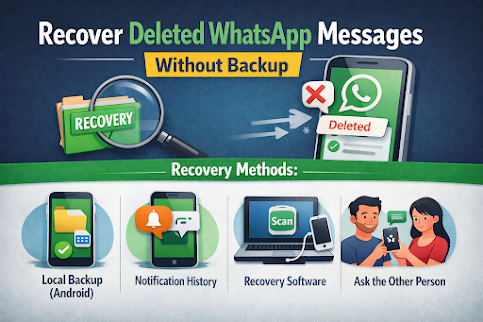
How to Recover Deleted WhatsApp Messages Without Backup (The Complete Truth)
Losing important WhatsApp messages can be frustrating and sometimes even stressful, especially when there is no backup available. Many articles online promise instant or guaranteed recovery methods, but most of those claims are exaggerated or completely false. The reality is that recovering deleted WhatsApp messages without a backup is difficult and, in some cases, impossible. However, there are a few legitimate methods that may work under specific conditions.
This article explains what actually happens when WhatsApp messages are deleted, which recovery methods are real, which ones do not work, and what you can realistically expect. Everything in this guide is based on how WhatsApp, Android, and iOS actually function.
Understanding What Happens When WhatsApp Messages Are Deleted
To understand recovery, it is important to know how WhatsApp stores messages on your device.
WhatsApp messages are stored in an encrypted database file on your phone. When you delete a message or an entire chat, WhatsApp does not immediately erase the data from your phone’s storage. Instead, it marks that space as available to be overwritten by new data. As soon as new information is written over that space, the deleted messages become permanently unrecoverable.
This means recovery is only possible if the deleted data has not yet been overwritten.
Key Factors That Affect Message Recovery
Several factors determine whether recovery is possible:
-
How quickly you act after deletion
-
Whether your phone continues to receive new data
-
Whether a local backup exists (Android only)
-
Whether notifications were recorded
-
Whether storage space has been overwritten
The more you use your phone after deletion, the lower the chance of recovery.
Method 1: Recover Deleted WhatsApp Messages Using Local Backup (Android Only)
This is the most reliable method for recovering deleted WhatsApp messages without a cloud backup, but it only works on Android devices.
How Local Backups Work on Android
Even if you never enabled Google Drive backup, WhatsApp automatically creates local backups on Android devices. These backups are usually created once every day and stored in the phone’s internal storage.
These files are saved in a folder called “Databases” inside the WhatsApp directory. Older backup files may still contain messages that were deleted later.
Step-by-Step Instructions
-
Open the file manager on your Android phone
-
Navigate to Internal Storage or SD Card
-
Open the WhatsApp folder
-
Open the Databases folder
-
You will see several files with dates in their names
-
Choose a file dated before the messages were deleted
-
Rename that file to “msgstore.db.crypt14”
-
Uninstall WhatsApp from your phone
-
Reinstall WhatsApp from the Play Store
-
Verify your phone number
-
When prompted, choose Restore
WhatsApp will restore messages from the selected local backup file.
Limitations of This Method
-
Works only on Android devices
-
You will lose messages received after the backup date
-
Does not work if local backup files are missing
-
Does not work if data has already been overwritten
Method 2: Recover Messages Using Android Notification History
This method does not truly restore deleted WhatsApp chats, but it may help you retrieve text messages that appeared as notifications.
How This Method Works
When WhatsApp receives a message, Android displays a notification. If notification history is enabled, the message text may be stored in the system log even after deletion.
How to Check Notification History
-
Open your phone’s Settings
-
Go to Notifications
-
Tap Notification History
-
Scroll through WhatsApp notifications
If the deleted message appeared as a notification, you may be able to read it again.
Limitations
-
Only works if notification history was enabled before deletion
-
Only retrieves text messages
-
Does not recover photos, videos, or voice messages
-
Messages may be truncated
Method 3: Using Third-Party Data Recovery Software
Some third-party tools claim to recover deleted WhatsApp messages without backups. These tools may work in certain situations, but success is not guaranteed.
How These Tools Work
These programs scan your phone’s internal storage looking for fragments of deleted WhatsApp databases. If the data has not been overwritten, the tool may be able to extract it.
What to Expect
-
Requires a computer
-
Requires USB connection
-
May require USB debugging or special permissions
-
Some tools require root access on Android
-
Most tools are paid
Important Reality Check
-
Recovery is not guaranteed
-
Effectiveness depends on device model and usage
-
Rooting a phone carries security risks
-
iPhone recovery without backup is extremely limited
These tools should be used carefully and only from reputable companies.
Method 4: Ask the Other Person to Export the Chat
If the conversation involved another person, and they still have the chat, this is one of the most reliable ways to retrieve the information.
How It Works
The other person can export the chat from their WhatsApp app and send it to you via email or file transfer.
Advantages
-
Complete chat history from their side
-
Can include media files
-
Does not require technical tools
Disadvantages
-
Requires cooperation from the other person
-
Does not restore the chat into your WhatsApp app
-
Exported chats are read-only files
iPhone Users: The Hard Truth About Recovery Without Backup
Recovering deleted WhatsApp messages on iPhone without any backup is extremely difficult.
Unlike Android, iPhones do not store accessible local WhatsApp backups. All WhatsApp backups on iPhone are stored in iCloud. If iCloud backup was never enabled, recovery options are very limited.
Possible Options
-
Attempt recovery using advanced data recovery software
-
Check if any partial data remains on the device
Reality Check
-
Success rate is very low
-
Apple’s encryption prevents deep storage access
-
No guaranteed method exists without a backup
What Does NOT Work (Important Warnings)
Many websites promote false or misleading methods. These do not work:
-
Websites asking for your WhatsApp verification code
-
Online tools claiming instant recovery without installing software
-
Free apps claiming full recovery without permissions
-
Websites asking for your WhatsApp login details
These methods are either scams or technically impossible.
What to Do Immediately After Deleting WhatsApp Messages
If you have just deleted important messages, follow these steps immediately:
-
Stop using your phone
-
Turn on airplane mode
-
Avoid installing new apps
-
Avoid taking photos or videos
-
Check for local backups on Android
-
Attempt recovery as soon as possible
The faster you act, the higher the chance of success.
Summary of Recovery Methods
| Method | Works | Notes |
|---|---|---|
| Android local backup | Yes | Most reliable method |
| Notification history | Partial | Text only |
| Recovery software | Sometimes | Not guaranteed |
| Export chat from other user | Yes | Read-only |
| iPhone without backup | Rare | Very limited |
Preventing Future WhatsApp Message Loss
The best way to protect your WhatsApp messages is to enable automatic backups.
For Android users, enable Google Drive backups and set them to run daily.
For iPhone users, enable iCloud backups and ensure enough storage is available.
Regular backups are the only guaranteed way to recover deleted WhatsApp messages.
Final Conclusion
Recovering deleted WhatsApp messages without a backup is possible only under certain conditions. Android users have more recovery options due to local backups and system access. iPhone users face stricter limitations due to encryption and storage restrictions.
There is no magic solution and no guaranteed recovery method without a backup. Any source claiming otherwise is misleading. Understanding the real possibilities and limitations helps you make informed decisions and avoid scams.
The safest and most reliable approach is prevention. Enabling automatic backups ensures that your WhatsApp conversations remain protected, no matter what happens.