The Jetpack plugin is one of the most versatile plugins that you can add to your WordPress site. It’s constantly getting new features and capabilities, and can likely replace some of the other plugins that you are already using.
There are a couple of settings in Jetpack that you might be using and not even be aware of, including its spelling and grammar checker. This works the same way that many other spelling and grammar checkers do, but it’s actually fairly customizable and can do some of the more advanced checks found in more robust word-processing applications. So continue below and find out where to go to change the spelling and grammar settings for the Jetpack plugin.
How to Change Spelling and Grammar Settings in the Jetpack Plugin
The steps in this article were performed on a site running WordPress 5.1.1, and using the Jetpack plugin version 7.2.1. This guide assumes that you have already installed and activated the Jetpack plugin on your self-hosted WordPress site.
Step 1: Sign into the admin section of your site at (yourdomain.com)/wp-admin.
Step 2: Hover over Jetpack in the left column, then choose the Settings option.

Step 3: Select the Writing tab at the top of the window.

Step 4: Scroll down to the Composing section of the menu, then click the arrow to the right of Check your spelling, style, and grammar.

Step 5: Enable each of the options that you would like to use.
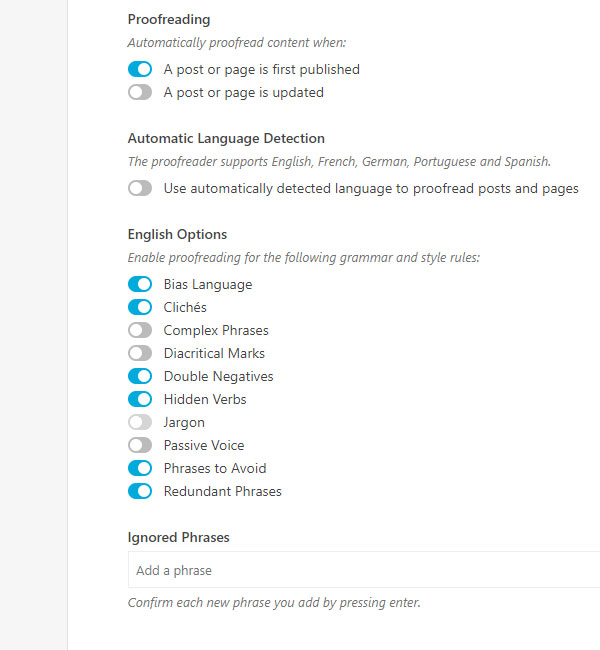
Note that your settings will update automatically after you enable one of these options, so you won’t need to manually save these changes.
As shown in the image above, these spelling and grammar checks include:
- Bias Language
- Cliches
- Complex Phrases
- Diacritical Marks
- Double Negatives
- Hidden Verbs
- Jargon
- Passive Voice
- Phrases to Avoid
- Redundant Phrases
Additionally you can elect when Jetpack should perform this check (either after a post is published, updated, or both) as well as whether it should use automatic language detection.