How to Add Header Code to Blogger and WordPress (Step-by-Step Guide)
Sometimes, you’ll need to place specific scripts inside the head section of your website—between the <head> and </head> tags. These scripts are essential for integrating tools that help with monetization, tracking, and site verification.
Common examples include:
- Google AdSense auto ads code
- Facebook Pixel tracking code
- Site verification codes for search engines
- Analytics scripts
If you’re running a blog on either Blogger or WordPress, this guide walks you through how to add header code correctly and safely.
Why Header Code Is Important
The head section of your website loads critical scripts before the page content appears. Placing code here ensures tools like Google AdSense, Facebook Pixel, and Google Search Console can function properly.
Incorrect placement can lead to:
- Scripts not working
- Tracking errors
- Verification failures
That’s why it’s important to follow the correct steps for your platform.
How to Add Header Code to Blogger (Blogspot)
If you’re using Blogger, adding header code requires editing your theme’s HTML.
Steps:
- Sign in to your Blogger dashboard
- Go to Theme
- Click Edit HTML
- Click anywhere inside the code editor
- Press CTRL + F and search for
</head> - Paste your header code just above the
</head>tag - Click Save
Important Tip:
Always double-check that you’re pasting the code in the correct location. Placing it outside the <head> section may prevent it from working.
How to Add Header Code to WordPress
If you’re using WordPress, you have multiple options. The easiest method is using a plugin—no coding required.
Method 1: Using a Header Plugin (Recommended)
- Log in to your WordPress dashboard
- Go to Plugins → Add New
- Search for a plugin like Header and Footer Scripts
- Install and activate the plugin
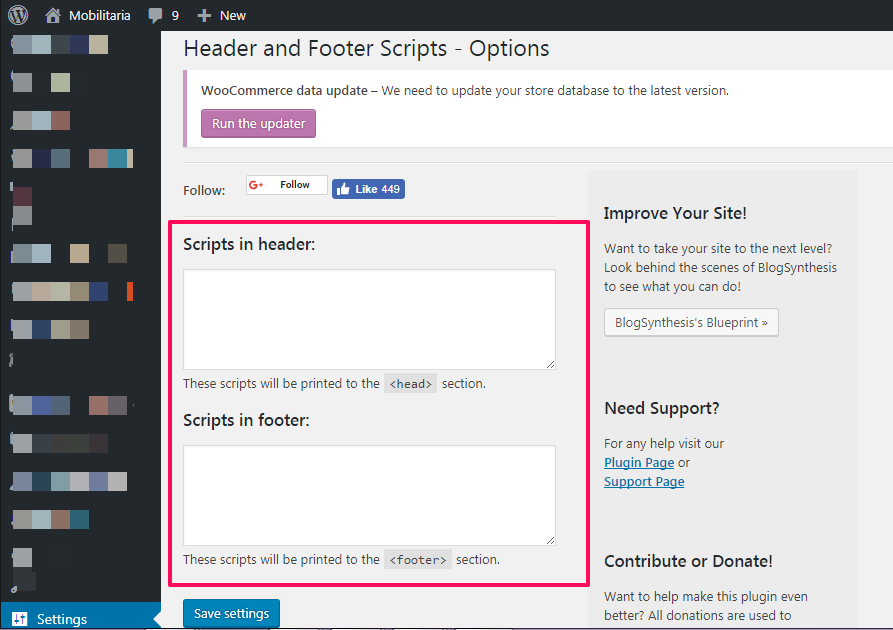
- Navigate to Settings → Header and Footer Scripts
- Paste your code into the “Scripts in Header” section
- Save your changes
Method 2: Using Insert Headers and Footers Plugin
Another popular option is the Insert Headers and Footers plugin.
Steps are similar:
- Install and activate the plugin
- Go to Settings → Insert Headers and Footers
- Paste your code into the header section
- Save changes
When Should You Add Header Code?
You’ll typically need to insert header code when:
- Setting up ads with Google AdSense
- Installing tracking tools like Facebook Pixel
- Verifying your site with Google Search Console or Bing Webmaster Tools
- Adding analytics scripts
Best Practices to Follow
To avoid issues, keep these tips in mind:
- Always copy the full code exactly as provided
- Paste it above the closing
</head>tag - Avoid editing other parts of the code unless necessary
- Backup your theme before making changes (especially on Blogger)
Final Thoughts
Adding header code to your blog is a simple but important step in setting up monetization, tracking, and site verification tools. Whether you’re using Blogger or WordPress, the process is straightforward once you know where to place the code.
Take your time, follow the steps carefully, and your scripts should work perfectly without affecting your site’s performance